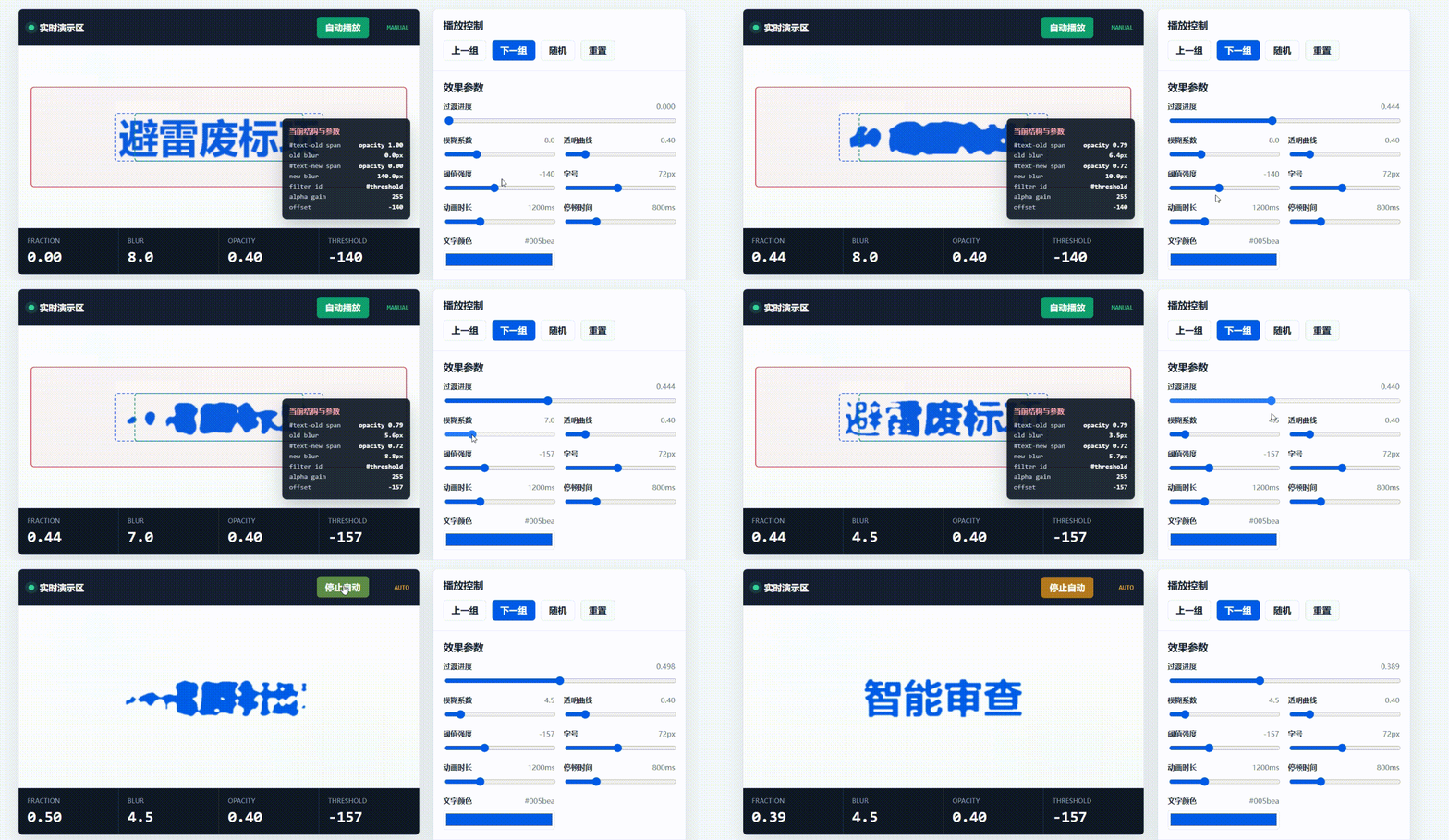
扒了一个好玩的文字融化切换效果
时隔多日再次网上冲浪,偶然逛到‘易标AI’的官网:易标AI,发现了一个比较好玩文字切换效果,分享给大家。

个人觉得想法比较新颖,扒了一下网站的代码只找到了此效果的DOM结构,那我我们根据DOM结构以及运行时的动态就不难推理出它的实现原理
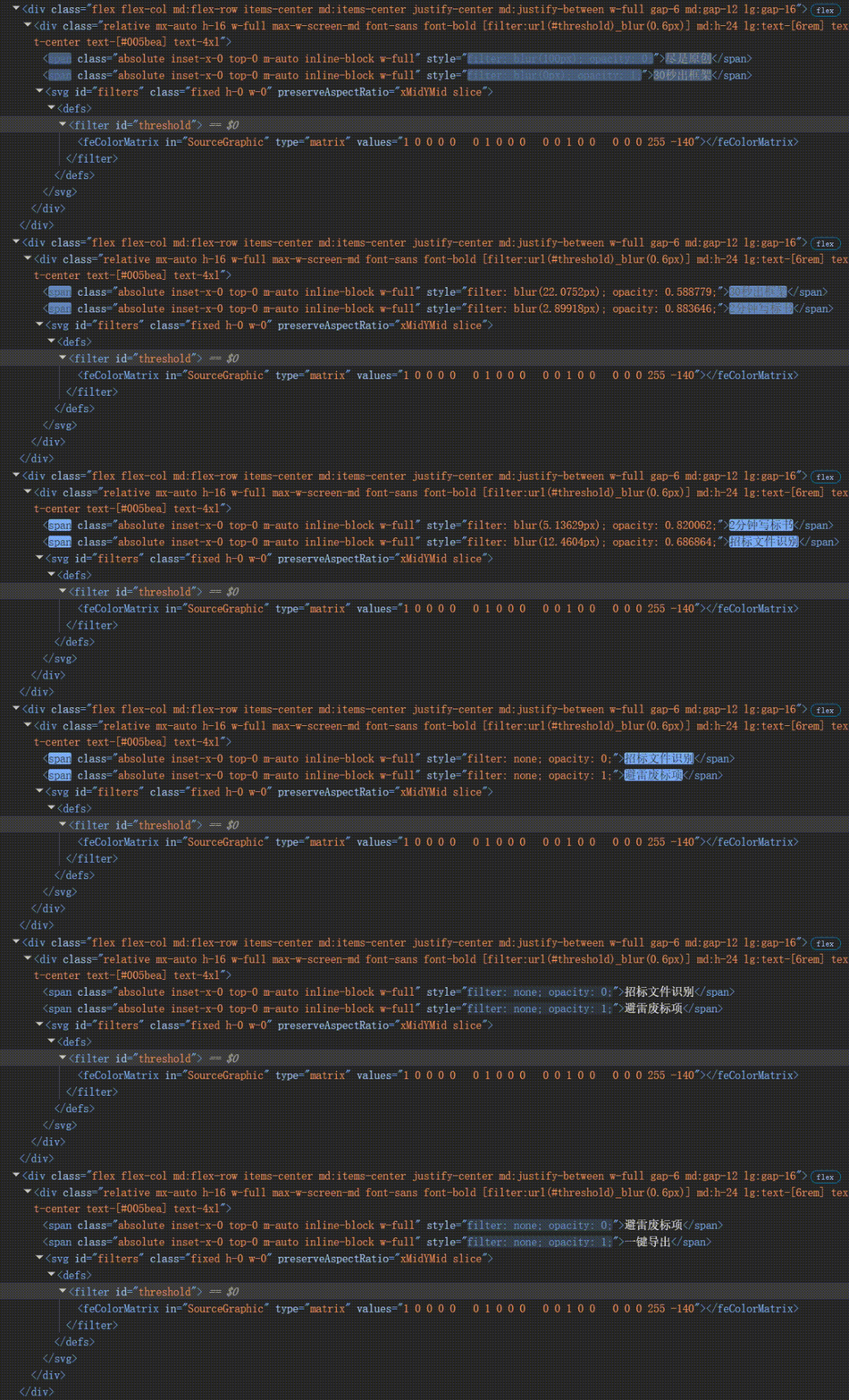
本质上就是
通过两层文字绝对定位重叠
计算渐变值控制文字,使用不同 blur 值 + opacity 制造层次
叠加SVG feColorMatrix 滤镜制造高对比度熔化边缘
效果演示地址:https://khyron.cn/morph-text/
以下就是针对于项目运用利用AI生成的技术文档一次Vue版本的通用组件代码,有需要的可以自行获取
MorphText 公共组件技术文档
1. 组件定位
MorphText 是一个可复用的融化文字切换组件
组件严格沿用经典融化文字结构:

```html
<div filter="url(#threshold) blur(...)">
  <span style="filter: none; opacity: 0">旧文字</span>
  <span style="filter: none; opacity: 1">当前文字</span>
  <svg>
    <filter id="threshold">
      <feColorMatrix values="... 255 -140" />
    </filter>
  </svg>
</div>
两个 span 永远作为唯一文字层:第一个承接离场文字,第二个承接入场/当前文字。动画通过 requestAnimationFrame 每帧直接更新两个文字层的 filter 和 opacity,不依赖 CSS transition 或 class 状态机。
2. 使用示例
<script setup lang="ts">
import MorphText from "~/components/common/MorphText/index.vue";

const words = ["避雷废标项", "一键导出", "智能审查", "风险预警"];
</script>

<template>
  <MorphText
    :texts="words"
    class="h-16 text-4xl font-bold md:h-24 lg:text-[6rem]"
    color="#005bea"
    :morph-time="1.2"
    :cooldown-time="1.6"
    :threshold="140"
    @change="({ text }) => console.log('current:', text)"
  />
</template>
如果业务侧仍使用 Tailwind,可以直接通过 class 控制尺寸、字体、字号和布局。组件内部只负责两层文字、滤镜和动画。
3. Props
| Prop | 类型 | 默认值 | 说明 |
|---|---|---|---|
texts |
string[] |
必填 | 循环展示的文字列表,至少 2 项时启用动画 |
startIndex |
number |
0 |
初始可见文字索引 |
morphTime |
number |
1.2 |
单次融化过渡时长,单位秒 |
cooldownTime |
number |
1.6 |
两次过渡之间的停留时长,单位秒 |
blurStrength |
number |
8 |
blur 计算强度,越大融化越明显 |
maxBlur |
number |
100 |
最大 blur 像素,避免 fraction 接近 0 时产生无限值 |
opacityPower |
number |
0.4 |
opacity 曲线指数,越小两层重叠越充分 |
threshold |
number |
140 |
feColorMatrix 的 alpha 阈值 |
filterBlur |
number |
0.6 |
容器额外 blur,用于柔化 threshold 边缘 |
filterId |
string |
自动生成 | 自定义 SVG filter id,多实例默认不会冲突 |
autoplay |
boolean |
true |
是否自动播放 |
pauseOnHover |
boolean |
false |
鼠标悬浮时是否暂停 |
reduceMotion |
boolean |
false |
强制关闭 morph 动画;组件也会尊重系统 prefers-reduced-motion |
color |
string |
#005bea |
文字颜色 |
rootClass |
string/string[]/Record |
"" |
根节点附加 class |
textClass |
string/string[]/Record |
"" |
两个文字层附加 class |
4. Emits
| 事件 | 参数 | 说明 |
|---|---|---|
morph-start |
{ fromIndex, toIndex, fromText, toText } |
每轮融化开始时触发 |
change |
{ index, text } |
每轮切换完成后触发 |
5. 核心设计
5.1 双层 span 固定角色
组件内部保留两个文字层:
text1:离场层。morph 时显示上一段文字,并逐渐强模糊、降低透明度。text2:入场/当前层。冷却期可见;morph 时显示下一段文字,并从强模糊逐渐清晰。
冷却期始终恢复到这个状态:
text2.style.filter = "none";
text2.style.opacity = "1";
text1.style.filter = "none";
text1.style.opacity = "0";
这样可以避免层角色在多轮切换后反转,也不会产生旧状态污染下一轮的问题。
5.2 requestAnimationFrame 逐帧计算
组件没有使用 setInterval + CSS transition。原因是融化效果依赖两个文字层在每一帧都保持连续变化,如果只切换 class,浏览器可能在某些帧先应用离场态、后应用入场态,容易出现黑屏或断层。
核心逻辑:
function setMorph(fraction: number) {
  const incoming = Math.max(fraction, 0.0001);
  const outgoing = Math.max(1 - fraction, 0.0001);

  text2.style.filter = `blur(${getBlur(incoming)}px)`;
  text2.style.opacity = `${Math.pow(fraction, opacityPower)}`;

  text1.style.filter = `blur(${getBlur(outgoing)}px)`;
  text1.style.opacity = `${Math.pow(1 - fraction, opacityPower)}`;
}
fraction 从 0 到 1:
text1从清晰旧文字变成强模糊并淡出。text2从强模糊新文字变成清晰并淡入。- 两层在同一帧更新,阈值滤镜能稳定合成,不会出现中间黑屏。
5.3 blur 计算
function getBlur(fraction: number) {
  if (fraction <= 0) {
    return maxBlur;
  }

  return Math.min(blurStrength / fraction - blurStrength, maxBlur);
}
这个公式的特点:
fraction越接近 0,blur 越大,文字越像融化团块。fraction越接近 1,blur 越小,文字越清晰。maxBlur用于限制极值,避免过大的 blur 影响性能。
5.4 SVG threshold 滤镜
组件通过 feColorMatrix 提升 alpha 阈值:
<feColorMatrix
  in="SourceGraphic"
  type="matrix"
  values="1 0 0 0 0  0 1 0 0 0  0 0 1 0 0  0 0 0 255 -140"
/>
配合容器上的 filter: url(#threshold) blur(0.6px),两层模糊文字会被合成为类似液态粘连的边缘。
6. 为什么这样封装
高扩展性
- 文本、时长、模糊强度、阈值、颜色都通过 props 控制。
- 支持多实例,每个实例默认生成独立 filter id。
- 暴露
morph-start/change事件,业务可以做埋点、联动背景或同步其它 UI。 - 支持
rootClass/textClass,不限制业务侧使用 Tailwind、Less 或其它样式体系。
稳定性
- 不使用 class 状态机,避免旧 class 残留造成第二轮以后动画异常。
- 冷却期固定恢复为“第二层可见,第一层隐藏”,层角色稳定。
- 页面隐藏时暂停 RAF,重新显示后继续运行,减少后台资源消耗。
性能
- 每帧只更新两个 DOM 节点的
filter和opacity。 will-change: opacity, filter提示浏览器优化。contain: layout paint限制重绘影响范围。maxBlur限制极端 blur 数值。
7. 注意事项
- 容器本身是绝对定位文字层,业务侧需要给组件设置明确高度,例如
h-16 md:h-24。 filter和blur都有一定渲染成本,不建议在同一页面同时放置大量实例。- 如果用于大屏首页,建议只在首屏使用 1 到 2 个实例。
- 对动效敏感场景可以设置
reduce-motion,或者依赖系统prefers-reduced-motion自动降级。
8. 推荐参数
<MorphText
  :texts="['避雷废标项', '一键导出', '智能审查', '风险预警']"
  class="h-16 text-4xl font-bold md:h-24 lg:text-[6rem]"
  color="#005bea"
  :morph-time="1.2"
  :cooldown-time="1.6"
  :blur-strength="8"
  :max-blur="100"
  :opacity-power="0.4"
  :threshold="140"
  :filter-blur="0.6"
/>
代码地址下载:MorphText.vue
- 感谢你赐予我前进的力量
-
 微信
微信  支付宝
支付宝





.gif)